Spatial Ensemble Technology
Design movement
in space.
SET is spatial design software for performance designers and educators. Place performers, shape formations, draw pathways — then watch the show from the seat it will be watched from.
SET is in private preview ahead of its official release.
What SET is
Design where every performer goes.
Build formations, draw pathways, set counts, and see how the show moves across the floor. SET brings the spatial side of show design into one clear workspace.
- Design at real scale
- Work directly on the performance space at its actual dimensions.
- Built for show designers
- Create formations and movement the way you already think through a show.
- From 2D to 3D
- Design in 2D, then check the result in 3D without losing your place.

Product philosophy
SET assists movement.
It does not generate design.
You place the performers, decide the formations, and draw the pathways. Those creative decisions are yours.
SET helps you carry them out — moving what you built, following the path you drew. Assistance, not authorship.
SET is not a formation generator. Even its formation tools only arrange the performers you choose, on a shape you draw.
What assistance looks like
Move a selected group together
Move a line or group as one, keeping the spacing you designed.
Follow-the-leader pathways
Set the order, drag the leader, and the group follows the route. Every arrival stays yours to shape.
Formation tools
Draw a line, arc, circle, block, or wedge, choose who goes on it, and SET spaces them along it.

Drawing in SET
Draw the path with your own hand.
On iPad, draw each pathway onto the floor with touch or Apple Pencil — curved where the movement curves, not a straight line between two points.
SET keeps the line exactly as you drew it.
Core to SET, in every environment.
Flagship environment
Winter Guard is where SET begins.
Floors, sets, counts, pathways, and equipment — what a guard designer works with every day. Everything else in SET grows from here.

Sets
Build the show set by set: add a set, update it, or revise the transition into it.
Transition counts and timing
Give each transition its counts and see where every set lands in the show.
Pathways
Every performer carries a path between sets, so a transition reads as a whole before it is taught.
Equipment controls
Assign equipment per performer and change it set to set; playback shows who carries what.
Music import and timing tools
Import the show's audio, set count one, and design against the real track.
The full Winter Guard picture, today and next.
Winter Guard in SET
Scroll to see the full timeline
Counts and time, held together.
Set each transition’s counts, mark count one on the track, and the show lines up with the music.

The show as a list of sets.
Every set carries its count length and where it lands in the show.
The guard environment, next
PlannedDirections we intend to take the guard environment. Not in SET today.
- Guard panels
- Panels on wheels
- Scenic pieces for the guard floor
Visualization
See it from the seat
it will be watched from.
Know whether a transition reads before the ensemble learns it. In 3D, performers walk the show with their equipment, facing where you set them — no imagining required.

Every angle that matters, and the ones that only matter to you.
Floor level, the seats, the whole arena, or free view among the performers — the same show from wherever you need to read it.
- Floor
- Low
- Middle
- High
- Arena
- Free View

Feature preview
Design what the ensemble wears and carries.
The ensemble in 3D as it will take the floor — in your costumes, carrying your flags.
Shown from a preview build. Not yet part of Try SET or the current private preview.

Costume Studio
See a costume on a performer in 3D. Start from a blank mannequin or your reference sheet, divide it into areas, and layer up to four fabrics in each — sequin that catches the light, mesh that shows what is beneath.
- Lycra
- Velvet
- Sequin
- Mesh
- Metallic / Lamé
- Satin
A staging aid, not a production garment rendering. The design is yours; SET never generates it.
Flag Studio
See your flag fly with the show. Bring artwork or a photo; Flag Studio lays it on the silk with the left edge at the pole, mirrored on the reverse like a single-ply silk.
- 01Your artwork

A photo or design you bring - 02Flag Studio
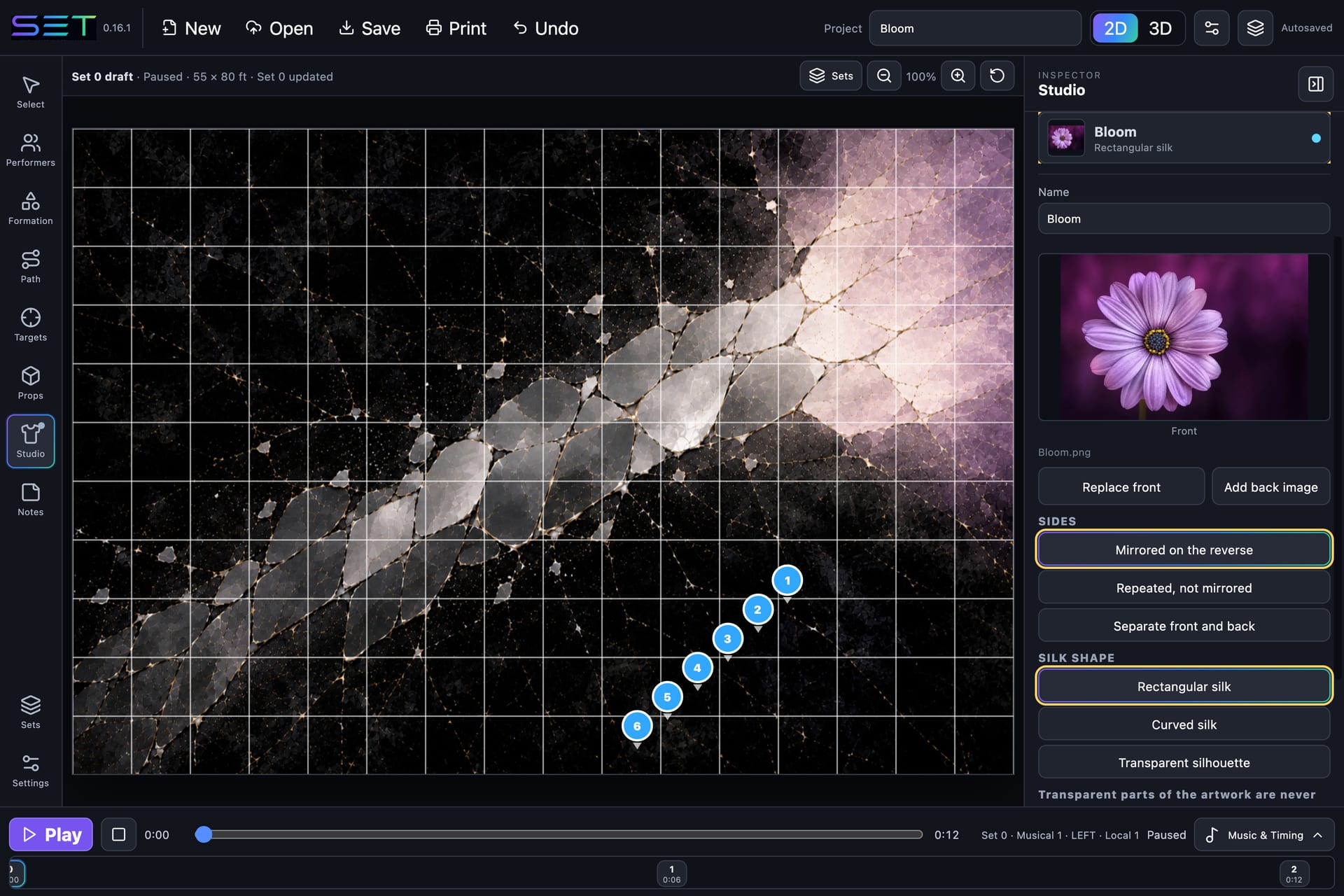
Laid on the silk, left edge at the pole - 03In 3D
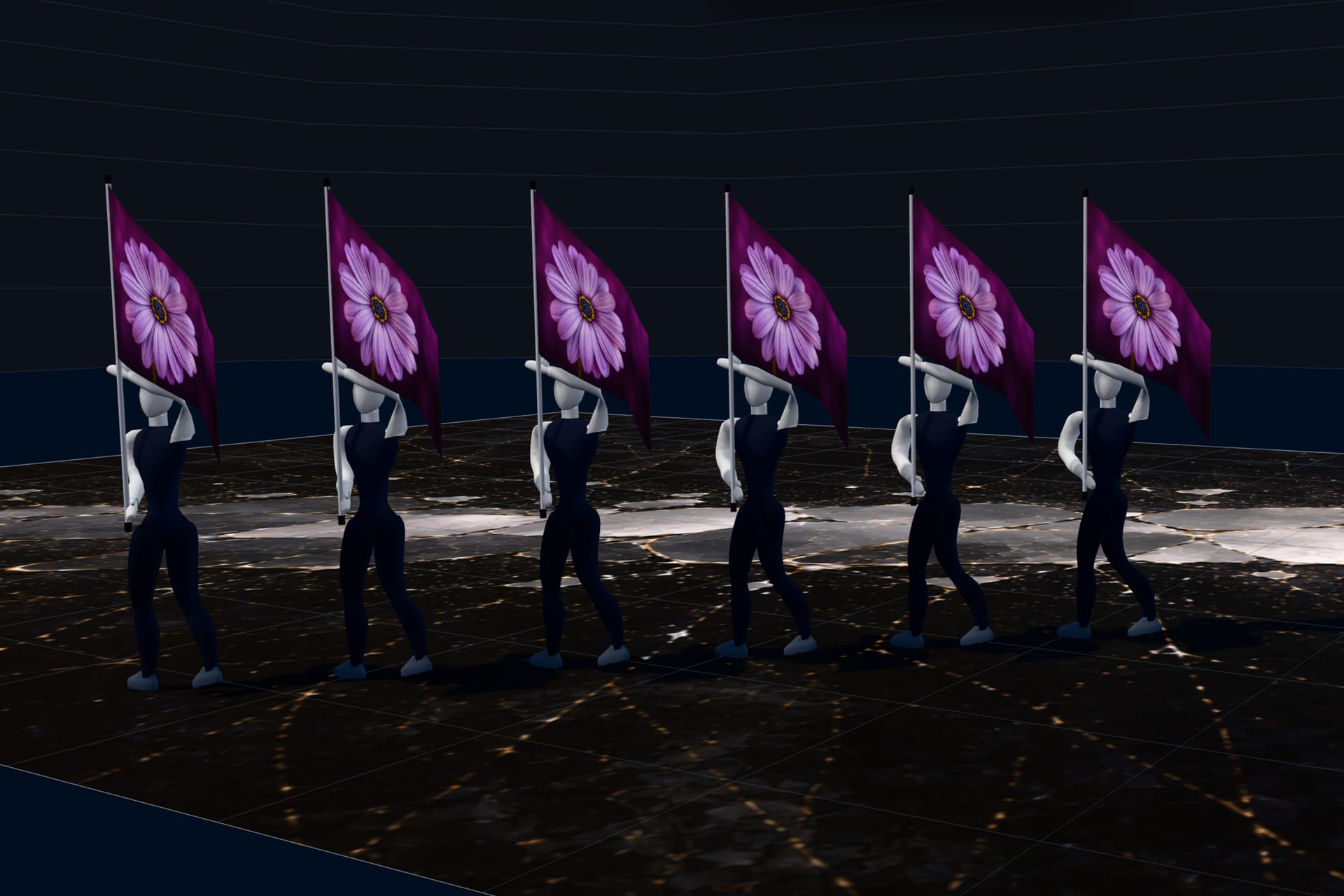
Flying with the performers


Environments
One way of thinking, five kinds of space.
Winter Guard is where SET is deepest, and every environment below is in the private preview.
- 01
Winter Guard
Available todayThe flagship, and where SET began.
- 02
Theater
Available todayBlocking worked out in space before the room is booked.
- 03
Dance / Drill Team
Available todayFor teams that move between the stage and the field.
- 04
ROTC
Available todayPrecision spacing, alignment, and sequence.
- 05
Flexible field environments
Available todayA football field for dance, drill, ROTC, and smaller marching ensembles.
Winter Guard first, then Theater, Dance / Drill, and ROTC — on whatever surface they perform on.
Roadmap
What’s here now. What’s coming next.
SET is already built around spatial design, movement, timing, music, 3D visualization, props, and multiple performance environments. We’re continuing to expand the platform without changing the core idea: you design the show, SET helps you see it.
Available now
Formations, pathways, counts, music, equipment, props, Theater mode, Dance / Drill and ROTC modes, 3D visualization, flags, and project save and open.
In development
Costume Studio, Flag Studio, expanded 3D equipment, and additional visualization tools.
Private preview
Refined alongside the designers using it.
A select group of designers and educators is refining SET with us ahead of its official release.
- A small group, by design
- Designers and educators working directly with the team building SET.
- Real shows, real feedback
- Preview designers build actual shows; what they need gets refined next.
- Deliberate about scope
- This site says plainly what exists today and what is still ahead.
Request Access
Access is by invitation. Tell us about your program and what you design, and we will be in touch as places open.
Designers and educators · limited places
Requests go to a monitored SET mailbox and are read by the team building it.
What does SET stand for?
Spatial Ensemble Technology — and a set is also what you build when you design a show. The overlap is intentional.
Does SET generate formations for me?
No. You place performers, decide formations, and shape pathways. Formation tools only space the performers you choose along a line, arc, circle, block, or wedge you draw. SET assists movement; it does not generate design.
What can SET do today?
2D design with hand-drawn pathways on iPad, formation tools, group moves, Follow-the-Leader, sets, counts and music timing, equipment, floor artwork, props, Theater, Dance / Drill, and ROTC / Military Drill modes, saving and opening projects, and 3D with performers who walk the show carrying their flags, from several camera views. Costume Studio and Flag Studio are in development. Anything labelled planned or in development is not part of SET today.
How do I get access to SET?
SET is in private preview, and access is by invitation. Use Request Access to tell us about your program, and we will be in touch as places open.
Is SET only for Winter Guard?
No. Winter Guard is where SET is deepest, and SET also has Theater, Dance / Drill, and ROTC / Military Drill modes, on stages, gyms, football fields, and custom areas you size yourself.
What will SET cost?
Pricing will be published ahead of the official release. SET is not sold from this site during the private preview, and preview access is not a purchase.
Do I keep the work I design in SET?
Yes. Projects save as portable .set files you keep on your own machine and can reopen any time.
Contact
Talk to a person.
Questions about the preview, a program, or something not working — reach a person.
The design is yours.
SET helps you move it.
SET is in private preview · access is by invitation